Skip to content
Agency Pilot

SEO audits

Choose the SEO audit that answers your question

Compare audit types, required inputs and outputs before running a diagnostic check. Review the credit cost and reused evidence, then turn relevant findings into an assigned investigation. For a prospect presentation, use the separate sales-report workflow.

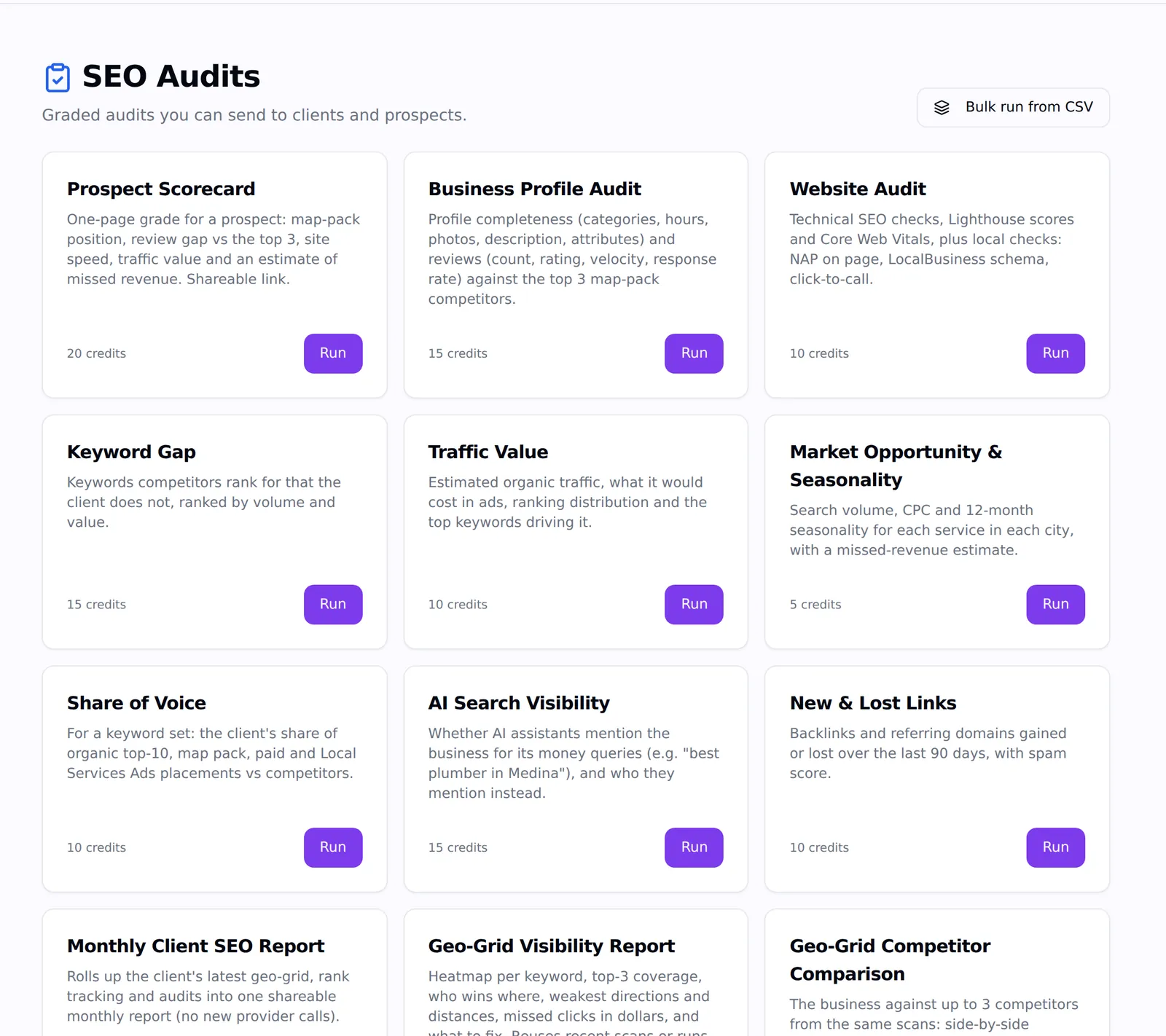
The SEO Audits catalogue in Agency Pilot with Prospect Scorecard, Business Profile Audit, Website Audit, Keyword Gap, Traffic Value and more
Every audit shows its credit cost before you run it.

Fifteen audit types

From a one-page prospect scorecard to a full sales report and a monthly progress report.

Branded share links

Reports carry your logo, colour, website, phone and email, and open without a login.

Report-opened alerts

Know when a prospect opens the report, and when they come back to it a day or more later.

Scheduled audits

Run any audit weekly or monthly; the share link is emailed automatically.

Bulk runs from a CSV

Upload up to 100 businesses and run the same audit on all of them, then export the results.

Cost before you run

A cost check shows what will be reused from earlier scans and what will actually run.

Every audit, and what it measures

Each audit is graded, written in plain language and built from live search data.

  • Prospect Scorecard: Map-pack position, review gap vs the top 3, site speed, traffic value and a missed-revenue estimate on one page.
  • Business Profile Audit: Profile completeness and reviews — count, rating, velocity, reply rate — against the top 3 map-pack competitors.
  • Website Audit: Technical checks, Lighthouse scores and Core Web Vitals, plus local checks: NAP on the page, LocalBusiness schema, click-to-call.
  • Keyword Gap: Keywords competitors rank for that the client doesn't, with volume and ad value.
  • Traffic Value: Estimated organic traffic, what it would cost in ads, ranking spread and the top keywords driving it.
  • Market Opportunity & Seasonality: Search volume, cost per click and 12-month seasonality for each service in each city.
  • Share of Voice: The client's share of the organic top 10, the map pack, paid ads and Local Services Ads against competitors.
  • AI Search Visibility: Whether ChatGPT and other AI assistants mention the business for its money queries, and who they mention instead.
  • New & Lost Links: Backlinks and referring domains gained or lost over 90 days, with spam score.
  • Monthly Client SEO Report: Rolls up the client's latest geo grid, rank tracking and audits into one monthly report.
  • Geo-Grid Visibility Report: Heat maps per keyword, top-3 coverage, weakest directions and missed clicks in dollars.
  • Geo-Grid Competitor Comparison: The business against up to three competitors on the same grid, side by side.
  • Geo-Grid Ranking History: Coverage and average rank trends across past scans of the same grid.
  • Sales Report (300 credits): The full pitch: nine grades, twelve sections, fixes ranked by value and a 90-day plan.
  • Progress Report (150 credits): Monthly results: leads and revenue from search, return on your fee, map and ranking trends, reviews, site health, AI visibility and work completed.

For prospects: audits that open conversations

Most audits run on public data, so you can audit a business before it's a client. A Prospect Scorecard fits on one page: map-pack position, how far behind the top three on reviews, site speed, the value of their traffic and an estimate of the revenue they're missing. Send it, and you'll know the moment they open it.

For a whole territory, upload a CSV of up to 100 businesses and run the scorecard on every one of them, then export the grades to prioritise your outreach.

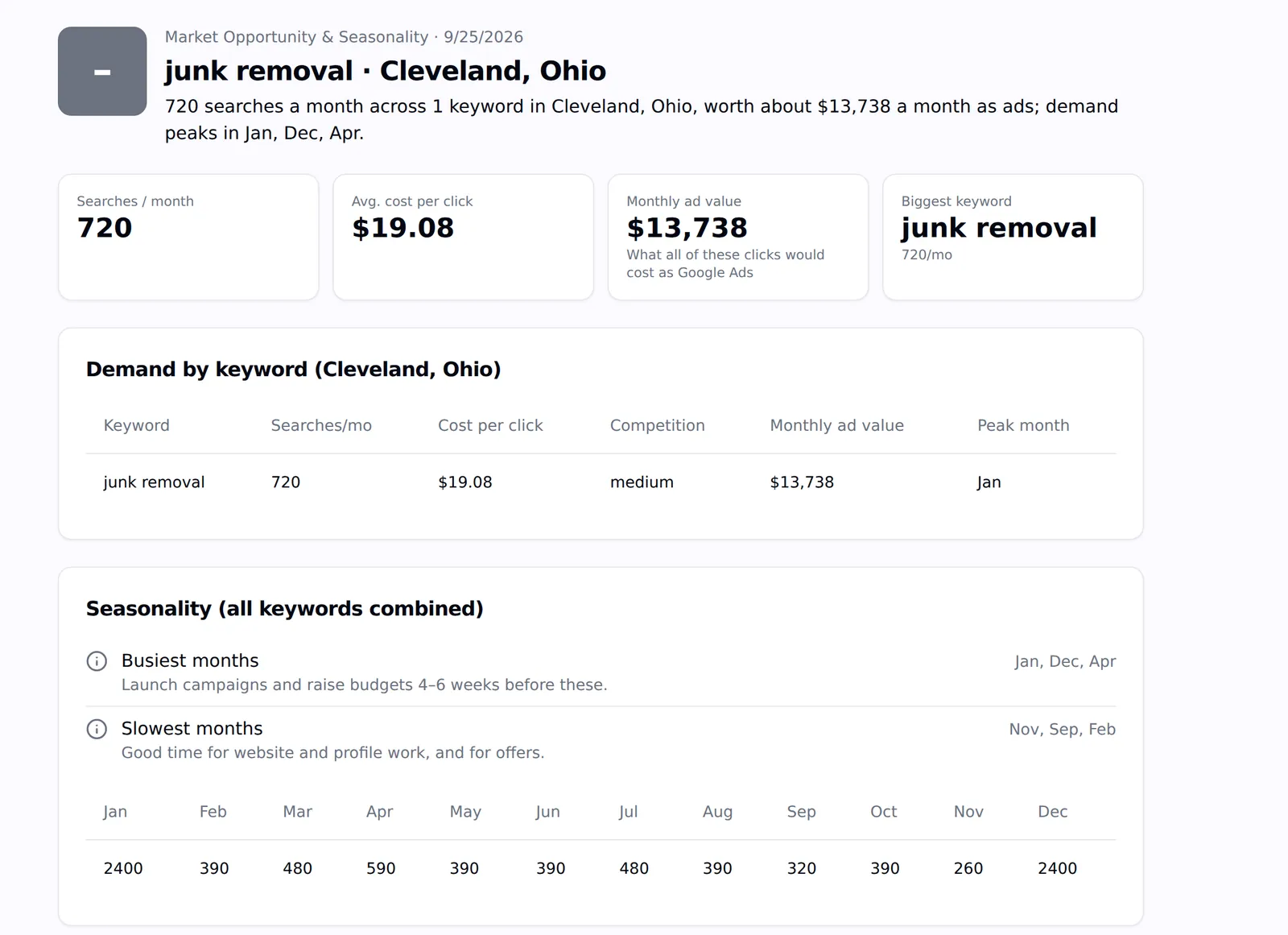
A Market Opportunity and Seasonality audit showing 720 searches a month worth $13,738 in ad value and seasonality by month
Market Opportunity: demand, ad value and the busiest months for a service in a city.

For clients: proof, every month

The Progress Report is the monthly report that answers "what did we get for the money": leads and revenue from search, return on your fee, map and ranking trends, reviews, site health, AI visibility and the work you completed. The Monthly Client SEO Report rolls up the latest geo grid, rank tracking and audits at no credit cost.

Mark any audit visible to the client and it appears in their portal, next to their dashboard.

What this does not do

Better to find this out here than three weeks in.

  • Audits read Google and public web data. They don't log into the client's accounts unless the audit uses a connected account's numbers (the Progress Report uses leads and revenue from Agency Pilot).
  • AI-written cover text is rejected if it adds any number that isn't in the data; the grades and figures are never AI-generated.
  • Reports show your branding but live on an Agency Pilot share link, not your own domain.

Questions

What is a local SEO audit?
A check of the things that decide local rankings and leads: the Business Profile, reviews, the website's technical health and local signals, keyword coverage and how the business compares with competitors in the map pack and organic results.
Can I white-label the reports?
Reports carry your agency's logo, brand colour and contact details, and the share page is about your agency. They're hosted on an Agency Pilot link rather than your own domain.
How much does an audit cost?
The Sales Report is 300 credits and the Progress Report 150; every other audit shows its cost before it runs. Scans an audit needs are reused when a recent one exists, so you don't pay twice.
Can I schedule audits?
Yes, weekly or monthly. After three failures in a row the schedule pauses and tells you.

Put your agency on autopilot

Start a 14-day trial with 300 credits. Add your first client and send an onboarding link today.

Choose an audit type for a defined diagnostic question

The audit catalogue is a selection guide for different questions about profiles, websites, keywords and competitive context. Start with the decision and identify the evidence needed, rather than automatically running every available report. Confirm the business and relevant inputs, then review the displayed cost and any reused data before beginning. The output should help you prioritize a justified investigation or task, not simply add another grade to a folder.

Use the local SEO sales report page when the specific objective is presenting a prospect with a broader opportunity and proposed scope. Use client reporting when the objective is reviewing work and evidence across an existing engagement. Those workflows can use audit findings, but the purpose of this page is to help select and interpret the underlying audit. Keeping that distinction clear makes it easier to choose the smallest useful investigation and avoid presenting a reused observation as fresh research.

Validate the business before interpreting the grade

Confirm that the selected business and location match the engagement. Similar names, multiple branches and old website addresses can lead to an apparently detailed report about the wrong entity. Review the public details and the intended search area before sharing the result. This basic check is especially important when preparing audits in bulk from a list of prospects.

Treat the grade as a summary of the measured evidence rather than a complete judgment of the business. Read the underlying findings and distinguish missing information, measured weaknesses and commercial assumptions. A strong presentation should explain what was observed, why it matters and what should happen next. The client needs that reasoning to assess a recommendation; a grade by itself cannot supply it.

Prioritize findings by consequence and effort

A long list of findings needs a practical order. Start with problems that prevent customers from finding, understanding or contacting the business. Then review opportunities that require more investigation or content work. Consider who controls the relevant system and whether the agency already has appropriate access. A recommendation that depends on the client supplying business details has a different path from a small correction your team can make immediately.

Use the audit as evidence for an agreed work plan. Assign an owner, describe the expected change and define how completion will be verified. Keep speculative benefits separate from confirmed defects. This approach helps an agency avoid selling a volume of tasks without explaining their value, and gives the next client review a clear record of what the team actually completed.

Keep public observations separate from account data

Some audit findings come from public search and website information; other reporting can use connected client information or recorded leads and revenue. Explain which source supports each claim. A public search estimate does not become a verified business outcome just because it appears beside a client's name in a branded report.

Before presenting financial figures, review their labels and assumptions. Ad-equivalent traffic value, potential opportunity and recorded revenue have different meanings. If you do not have the client's actual sales data, say so. Clear source distinctions protect the usefulness of the report and help the client ask the right follow-up questions rather than assuming that every displayed number came from their accounting or analytics account.

Make repeat audits genuinely comparable

A scheduled report creates a useful history when its underlying question remains consistent. Retain the same business, location and relevant query settings when measuring progress. If the scope changes, explain the new baseline. Record important website, profile or campaign changes in the team's working notes so later observations have context.

Read each result before using it to support a major recommendation. A newer report can contain reused data or observations collected at different times, depending on the audit and available inputs. The displayed cost check helps explain reuse, while the report's evidence should guide interpretation. Recurring delivery is convenient, but professional judgment still matters when deciding whether a finding represents a new issue or an existing condition.

Share a report with a clear next conversation

Before sending a branded report, check the business identity, contact details, cover text and the claims you intend to discuss. Choose a small number of findings that fit the client's priorities. A recipient should understand why the report is relevant without needing to interpret every table immediately.

Report-opened notifications can indicate that someone accessed the shared report; they do not establish agreement with its recommendations or readiness to buy. Use them as context for a helpful follow-up through your normal process. When the client approves work, translate the selected findings into tasks and retain the report as the starting evidence. The next review can then compare the original question, completed actions and subsequent observations.

Frequently asked questions

Which audit should I run first for a prospect?

Choose the smallest report that answers your outreach question. A scorecard can support an initial discussion, while a deeper audit suits a specific concern already raised by the prospect. Confirm the business and location first. The goal is a relevant conversation with useful evidence, not the largest possible collection of grades or an expensive report nobody has agreed to review.

Can I audit a business before getting account access?

Many audits use public search and website information and can support prospect research. That does not mean every available metric comes from a verified client account. Check the selected audit's inputs and explain the source of its findings. If a recommendation requires private performance data or access to make changes, arrange that separately through the appropriate client onboarding process.

How should I interpret a low audit grade?

Read the supporting findings before drawing a conclusion. A grade summarizes the areas measured by that audit; it is not a comprehensive statement about the quality or viability of the business. Identify the specific observations, validate important issues and prioritize the actions. This gives the client a practical explanation of the result rather than an alarming label without a plan.

Should I run every audit for every client?

Only when each report supports a real decision in the engagement. Different clients have different priorities and available evidence. Review the cost and purpose before running additional reports, and choose the ones your team can interpret and act on. A focused audit plan is easier for the client to understand than a large report pack with overlapping findings and no clear order.

What should I verify before a bulk audit run?

Check names, websites and locations in the input list, especially for businesses with several branches or similar names. Confirm that the selected audit answers the same question across the list and review the expected credit use. Afterward, inspect results before using grades to prioritize outreach. Bulk processing saves repetition but does not replace checking whether the underlying business identity is correct.

Can an audit change the client's website or profile?

An audit reports observations and recommendations; implementing a change is a separate action. Confirm who owns the website or profile, what access is needed and who approves the work. Record the completed change so the next review has context. Treating a report as the work itself can leave an important finding unresolved even though it has been documented and shared.

How do I choose which finding to fix first?

Consider the effect on the customer journey, the strength of the evidence, the effort required and who controls the system. A confirmed contact problem may deserve priority over a speculative content opportunity. Explain the reason for the order and assign an owner. This makes the plan reviewable and helps the client distinguish urgent corrections from longer-term improvements that need further investigation.

Are traffic-value estimates the same as actual revenue?

No. A figure based on search volume, estimated clicks or advertising costs expresses a modeled opportunity or comparison. Actual revenue requires recorded sales and an appropriate reporting process. Keep those labels distinct in your presentation. An estimate can support prioritization, but it should not be presented as money the client definitely earned, lost or will receive after implementing the recommended work.

How should I handle a finding I cannot reproduce?

Preserve the report details, including the page, business and observation context, then investigate before making a strong claim. Conditions can change between an audit and your manual review. Record what you could confirm and what remains uncertain. If the issue matters to a decision, seek another relevant observation rather than removing the uncertainty from the client-facing explanation.

What belongs in the cover text of an audit?

Explain why you ran it, identify the most relevant findings and propose a clear next discussion or action. Keep every factual claim aligned with the report's evidence. Avoid adding impressive numbers or predicted outcomes that the data does not establish. The cover text should help the recipient interpret the report, not turn a measured observation into a guarantee or unsupported sales claim.

How often should I repeat an audit?

Choose a schedule that matches the work and the decision being reviewed. A recurring client review may suit a monthly report, while a specific active investigation may justify another check. Keep settings consistent where comparison matters. Running more often is useful only when the new observation can inform an action, and the displayed cost should remain part of the planning decision.

What does an opened notification tell me?

It indicates a recorded report visit under the product's opened-alert behavior. It does not prove that the recipient read every section, agreed with the findings or approved work. Use it as context for a relevant conversation rather than as a substitute for a response. Ask about the business problem and the report's usefulness through your normal, appropriate follow-up process.

Can I use the same audit for sales and ongoing delivery?

You can retain the original report as a baseline, but adapt the conversation to the stage of the relationship. A prospect needs a clear explanation of the opportunity and proposed scope. An existing client needs evidence of completed work, current observations and next priorities. Keeping the original evidence available helps connect the promise of the engagement with the work later reviewed.

How should I document audit limitations?

State the data source, observation date, relevant scope and any important uncertainty beside the claim it affects. For example, distinguish an estimated traffic value from recorded sales or explain a changed scan area. Limitations make the report easier to use when they are specific. A vague disclaimer at the end does less to help a client interpret an individual finding correctly.

What makes an audit useful after the meeting ends?

A useful audit leads to an agreed action with an owner and a way to verify completion. Keep the report with the client's work record and note which recommendations were accepted, deferred or investigated further. At the next review, return to those decisions. This creates a clear connection between the evidence, the agency's work and the next observation rather than another disconnected report.