Skip to content
Agency Pilot

Website insight

Website monitoring for every client site

The tracking script doubles as a heartbeat: when a client's site goes quieter than it should for that hour, Agency Pilot checks it straight away. Every site is also checked every 15 minutes. If it's down, your owners and admins hear about it — usually before the client does.

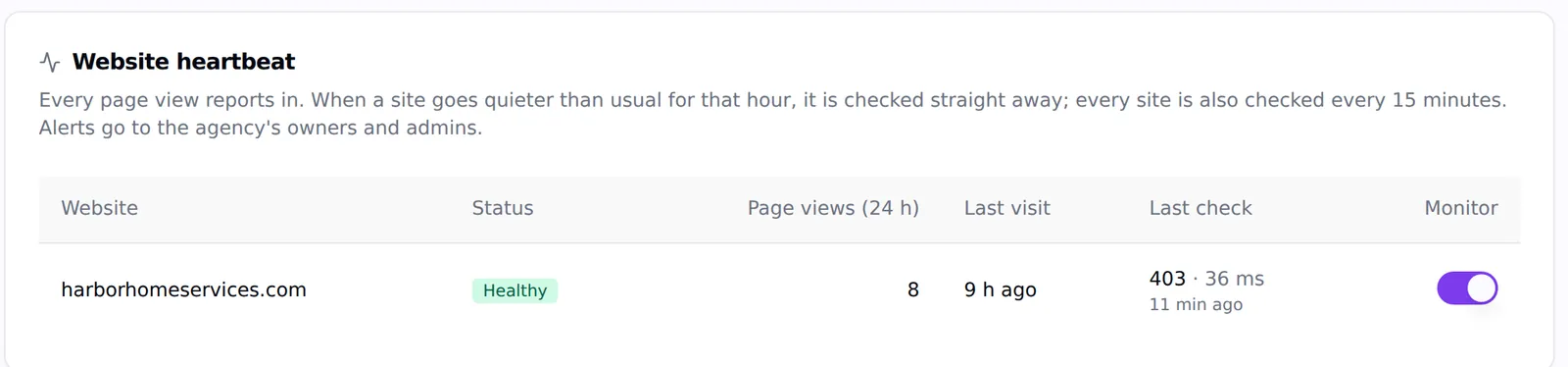
The Website heartbeat table showing a client site as Healthy with page views in the last 24 hours, last visit and last check response time
Status, traffic and the last check, per client site.

Real-traffic heartbeat

Unusual silence for the hour triggers a check immediately, not at the next interval.

Every 15 minutes

Every monitored site is checked on a schedule too; down needs two failed checks.

Alerts that matter

Owners and admins are told when a site goes down or the script stops running.

Why it's down

Domain doesn't resolve, no response within 12 seconds, pages erroring, script missing — in plain words.

In Mission Control

A down site becomes a critical attention card on the dashboard.

Included

Part of the tracking script on every plan — no separate uptime subscription.

Smarter than a ping

A normal uptime monitor asks "does the home page answer?" every few minutes. Agency Pilot also watches the real traffic: every page view reports in, and when a site goes quieter than it usually is for that hour — a silence that would happen less than 1% of the time — it's checked straight away. That can flag unusual traffic loss, page errors or a tracking script removed during a redesign. It does not submit forms or complete purchases, so a healthy status is not proof that checkout works.

Statuses you can act on

Each site shows one of: healthy, checking, down, script missing, script not running, pages erroring or checker blocked — with the response code and time of the last check. A site is only marked down after two failed checks, so you're not woken up by a blip.

What this does not do

Better to find this out here than three weeks in.

  • It monitors sites with the tracking script installed.
  • Checks come from our servers; a site that blocks them shows as checker blocked rather than down.

Questions

How is this different from a normal uptime monitor?
It adds a real-traffic heartbeat, to help identify unusual traffic loss and missing tracking as well as availability failures. It is not an automated test of a checkout or lead form.
Who gets the alerts?
Your agency's owners and admins, and a down site appears as a critical card in Mission Control.

Put your agency on autopilot

Start a 14-day trial with 300 credits. Add your first client and send an onboarding link today.

Make website uptime monitoring part of client care

A client website can be a brochure, a booking route and the destination for an active advertising campaign at the same time. When it becomes unavailable, the first useful question is which customer journey is affected. A successful response from the home page does not establish that a quotation form, appointment page or external booking service works. Build your monitoring process around the pages and actions the business relies on, then use an alert as the starting point for investigation.

Agency Pilot combines scheduled checks with a heartbeat from the tracking script. This gives your agency another way to notice unusual silence and a place to see website status alongside client work. Keep a short list of the main landing page, contact form and conversion destination for each client so the responder can distinguish an availability problem from a tracking or conversion problem.

Establish a baseline before treating silence as an outage

A quiet website on a Sunday evening may be behaving normally. A busy campaign landing page that suddenly stops reporting visits deserves a closer look. The difference is context: usual activity, business hours, recent campaigns and changes to tracking settings. When adding a site, confirm that the script is installed on expected pages and that ordinary visits are arriving. Record sections deliberately excluded from tracking so a later investigator does not mistake a planned omission for a fault.

Check the site from a normal browser as well as reviewing its status. A missing heartbeat can accompany a removed script even when visitors can still read the page. Conversely, a page that loads successfully can contain a broken form. Give the client a simple explanation of what is monitored and what requires a separate functional test. That baseline makes the first alert easier to assess.

Use the status to choose the next investigation

The website status should guide a specific next step. If the domain does not resolve, check the domain and hosting configuration with whoever manages them. If the site responds with an error, reproduce the affected address and preserve the response information. If the script is missing, compare the current page template with the version approved at launch. If the checker is blocked, ask the hosting or security owner to investigate before treating the result as proof that customers cannot get through.

Write down the time, affected address, observed status and recent changes before making repairs. Those details help a developer separate a deployment problem from a hosting incident or access rule. Agency Pilot marks a site down after two failed checks, which helps filter a brief interruption, but the status still needs interpretation. Use dashboard evidence together with a real customer journey.

Give alerts an owner and a practical response path

An alert is useful when someone knows what to do with it. Identify the person responsible for the website, the hosting contact and the agency colleague who communicates with the client. Agency Pilot notifies owners and admins; your internal process should determine which person takes responsibility for investigating. Avoid assuming that several people receiving the same alert means one of them has started work.

For an active incident, begin with a factual note: what appears affected, when it was noticed and what is being checked. Keep confirmed observations separate from possible explanations. If you are considering pausing a campaign or changing a domain setting, follow the client's agreed authority and escalation process. After service returns, confirm critical pages and forms before closing the incident. A restored home page is encouraging, but the client needs visitors to complete the action they came for.

Check monitoring after a redesign or site migration

Redesigns and migrations are moments when an otherwise healthy site can lose its tracking script. Add monitoring verification to the launch checklist alongside links, redirects and enquiry forms. Visit pages that use different templates, including campaign pages or a blog if they are part of the customer journey. Confirm that the correct installation remains present and that the site is associated with the intended client record.

A launch also changes the context around traffic. New URLs, altered consent choices or different campaign destinations can affect what your agency sees. Record the launch date so a future drop in observations can be investigated against an actual change. Keep the previous configuration available through the team's ordinary deployment process. The monitoring tool provides a signal; a disciplined launch record supplies the explanation needed to investigate without repeating the same discovery work.

Separate availability from speed and conversion quality

Uptime, page speed and successful enquiries are related measures with different meanings. A website can be available but slow on a mobile connection. It can be fast yet send its form to an address nobody reads. Website uptime monitoring focuses attention on availability and the tracking heartbeat; it is not a complete performance audit or a simulated checkout service. Include separate checks for the experience that matters to each client.

For a lead generation website, a useful review includes opening the main landing page on a phone, following its call to action and submitting an agreed test enquiry. Confirm that the enquiry reaches the correct destination and is clearly marked as a test. If traffic looks healthy but leads have fallen, examine the form and campaign context before concluding there is an outage. Keep these questions distinct to select the right evidence.

Report incidents as actions and lessons

When a client asks what happened, a clear timeline is more useful than a collection of status screenshots. Explain when the problem was detected, which journeys were affected, what the team confirmed and how the repair was checked. If the cause remains uncertain, say so and identify the next investigation. Avoid turning an estimated period of missing traffic into a precise lost-revenue claim without reliable evidence.

Use the incident to improve the next response. A missing script may suggest adding a tracking check to the release process. A blocked checker may require coordination with the hosting team. A contact gap may mean the agency needs a current escalation list. These are operational improvements your team can make around Agency Pilot's monitoring. They help turn recurring alerts into a more dependable client service without promising that every future outage can be prevented.

Frequently asked questions

What should I check first after a website alert?

Open the affected address and review the reported status, response information and last check time. Then test the main customer journey from a normal browser. Record what you can reproduce before changing settings. A domain failure, an error response and a missing tracking script call for different investigations, so begin with the observed symptom and involve the person responsible for that part of the website.

Can a website be healthy while its contact form is broken?

Yes. A page can respond successfully even when its form fails to submit or sends enquiries to the wrong destination. Treat availability monitoring and form testing as separate checks. For important lead pages, agree a periodic test with the client and confirm receipt at the actual destination. This provides evidence about the conversion journey that a successful page response alone cannot provide.

What does checker blocked mean for my client?

It means the monitoring request could not complete as expected because access was blocked. It does not by itself establish that ordinary visitors cannot use the site. Review the result with the hosting or security owner and compare it with a browser visit. Identify the specific rule and appropriate permitted access rather than disabling protection broadly just to clear an alert.

How should I handle a missing tracking script?

Check whether a recent redesign, plugin change or template update removed the installation. Confirm the expected script in the relevant templates and reinstall it through the normal website management process if necessary. Then verify that visits report again. Keep the interruption date in client notes so a later traffic review can distinguish missing observations from a genuine decline in activity.

Should every monitored site have the same response priority?

Set priorities around the client agreement and affected journey. A site receiving paid campaign traffic during business hours may need a different response from an informational site undergoing planned maintenance. Document expectations before an incident. The monitoring status identifies a problem, while your service agreement determines who responds, how quickly they investigate and when they provide an update to the client.

Does an alert prove the hosting provider caused the issue?

No. The symptom may involve hosting, a domain configuration, an application error, a security rule or the tracking installation. Review evidence before assigning a cause. Preserve the affected URL, timestamps and response details, then compare them with recent changes and provider information. This gives the responsible team a useful starting point and prevents an update from presenting an unconfirmed theory as fact.

What should I do during planned maintenance?

Record the maintenance window and tell the people responsible for alerts what changes are expected. After the work, verify key pages, forms and tracking. Do not assume a maintenance notice means every subsequent alert is harmless. A documented window gives the team context, but any continuing error or missing heartbeat after completion still deserves investigation and a clear owner for the next action.

How do I verify monitoring after moving a website?

Check the production domain, expected tracking installation and pages that use different templates. Open the main landing and contact pages and verify an agreed test enquiry. Review monitoring status after observations resume. Keep the migration date and domain or hosting changes in the client record so future questions about traffic or availability can be compared with the actual launch timeline.

Will monitoring tell me how much revenue an outage lost?

An availability signal alone cannot establish lost revenue. Impact depends on who attempted to visit, which journeys failed, whether customers returned and how sales are recorded. Describe the known interruption and review leads or sales around it, but label any financial estimate and its assumptions. Missing tracking observations are not proof that the same number of customers or purchases was lost.

Why might visits stop while the page still opens?

Possible explanations include a removed script, changed consent behavior, a template difference or simply a quieter period. Start by checking recent website changes and confirming the expected installation. Compare activity with the usual pattern for that time and test relevant pages. The heartbeat surfaces the question, but a browser check and configuration review are needed to decide what is actually affected.

Should I add a separate speed check to maintenance work?

Yes, if page performance is part of the service you provide. Availability and speed answer different questions. A successful response does not measure the full mobile loading experience or show whether an oversized image delays the page. Run a suitable performance assessment separately, retain its test conditions and review it after major template changes rather than reading uptime status as a speed score.

How can I avoid colleagues duplicating incident work?

Use a named incident owner and a shared place for updates in your existing workflow. The first responder should record what they are checking and the next update time. Other colleagues can contribute evidence without making conflicting changes. Agency Pilot's alerts provide awareness; your team still needs a clear handoff convention so an alert reliably becomes assigned work with someone responsible for completion.

What belongs in a client-facing outage update?

State the observed problem, known scope, action underway and when the client can expect another update. Use plain language and avoid claiming a cause before it is verified. When resolved, explain how the important customer journey was retested. If impact or duration is uncertain, keep that uncertainty visible rather than using a precise figure unsupported by the available evidence.

Can monitoring support a website care package?

It can support a care package when you clearly describe the checks, notification recipients and response process you offer. Distinguish monitoring from guaranteed recovery times or a promise that no outage will occur. Combine the signal with an agreed escalation path and separate functional checks where needed. The client should understand both what your agency observes and what happens when it receives an alert.

What should I review when the same alert keeps happening?

Compare repeated conditions with deployments, hosting events, security rules and tracking changes. Document a confirmed cause where possible and assign a preventive action to the appropriate owner. If evidence is incomplete, retain timestamps and observations for the next occurrence. A short recurring-issue record is more useful than treating each alert as unrelated or repeatedly clearing the symptom without investigating its source.